Amazon has the resources to know a lot about you: what you buy, what you watch, what you read, when you’re home, what you ask your voice assistant, what you eat, what websites and apps you use.
The sheer breadth of Amazon’s ecosystem sets it apart. It has woven itself into everyday life through online shopping, a streaming service and devices, e-readers home security cameras, smart speakers, grocery services, and other businesses that span entertainment, retail and gaming.
Individually, each of these products and services collect data to deliver what you’ve signed up for. Together, however, they create a remarkably detailed picture of your daily habits.
And the more you use Amazon, the easier it becomes for it to collect even more information about you.
The good news is that reducing Amazon’s knowledge about you doesn’t require giving up online shopping. In many cases, altering a few privacy settings can limit the amount of data that’s collected. In others, choosing different services or devices can give you greater control over where your information is stored and who has access to it.
In this guide, we’ll walk you through Amazon’s ecosystem and explain what data each service collects, why it matters, and the practical steps you can take to keep more of your personal information to yourself.
- How Amazon tracks your shopping habits
- How Ring cameras collect and share your data
- How Fire TV and Kindle track what you watch and read
- How Alexa collects and uses your voice data
- Amazon-owned companies you may not realize are collecting your data
- What is Amazon Web Services (AWS), and why does it matter?
- How to reduce Amazon’s tracking without giving up convenience
How Amazon tracks your shopping habits
Over 150 million Americans shop on Amazon every year. The company accounts for roughly 40% of all U.S. retail e-commerce sales(new window), giving the company a detailed view of millions of shoppers’ everyday lives.
Orders for baby products may indicate a growing family. Fitness equipment and supplements can hint at health goals. Gardening tools, pet supplies, kitchen appliances, books, and electronics all contribute to a profile of your interests and lifestyle.
Amazon Prime goes a step further. Because Prime encourages customers to centralize their shopping, streaming, reading, and music subscriptions under a single account, Amazon gains additional context on how you spend your time. Watching movies on Prime Video, listening to Amazon Music, or reading books on a Kindle paint a picture of your customer profile and can also reveal how often you’re home or how regularly you shop.
To be fair, data collection is common across e-commerce retailers. Every online retailer collects some information about its customers. To process an order, a company may need your name, shipping address, payment details, and contact information. It may also record your IP address, browser type, device identifiers, and the products you’ve viewed or purchased.
But privacy advocates have raised concerns about how Amazon handles customer information. A report by W(new window)IRED described how some Amazon employees improperly accessed customer order histories. It also said that it wasn’t uncommon for employees to look up the purchase histories of acquaintances.
How to protect yourself
You don’t have to stop using Amazon to limit its data collection. Review your Amazon privacy settings. (Instructions are below.) Disable browsing history if you don’t want products you have viewed to influence recommendations, and opt out of interest-based advertising where available.
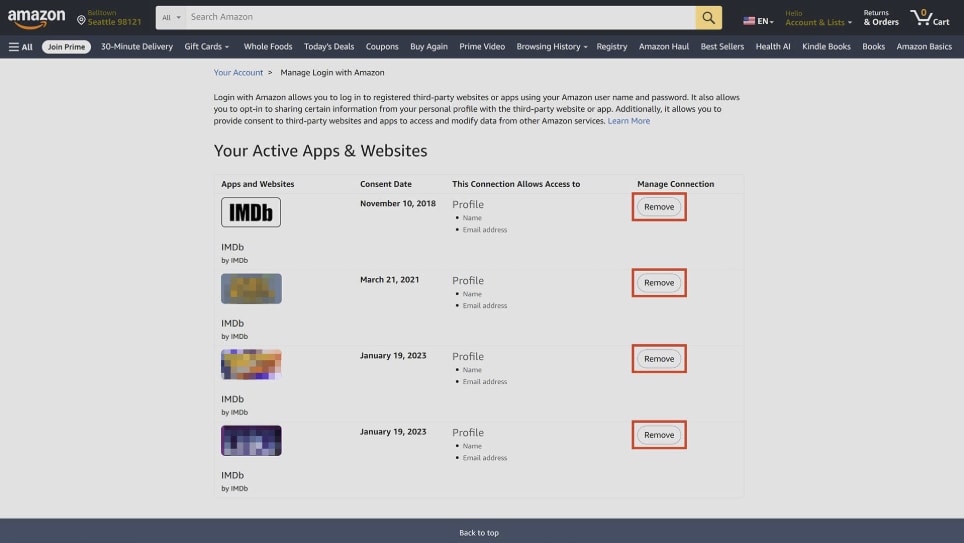
- Avoid using “Login with Amazon” to sign in to third-party websites, which allows Amazon to become part of your activity outside its own platform.

- Consider whether every purchase needs to go through Amazon. Buying directly from manufacturers, supporting independent retailers, or using specialized stores for books, electronics, and household goods helps spread your digital footprint instead of concentrating it in a single ecosystem. While no retailer is completely anonymous, reducing your reliance on any one platform makes it harder for a single company to build a profile of you.
To remove access, go to Your Account and click Remove next to any third-party app or site you no longer want connected to your account.
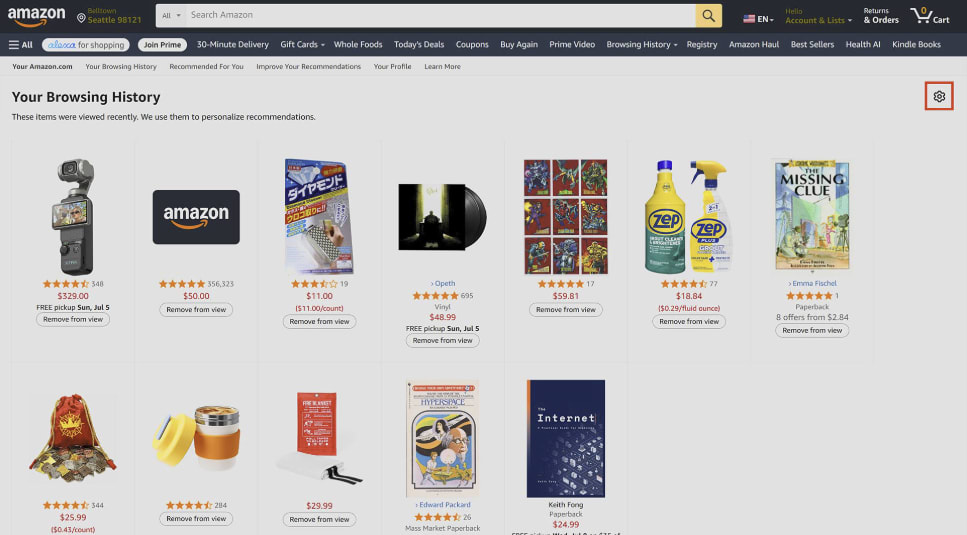
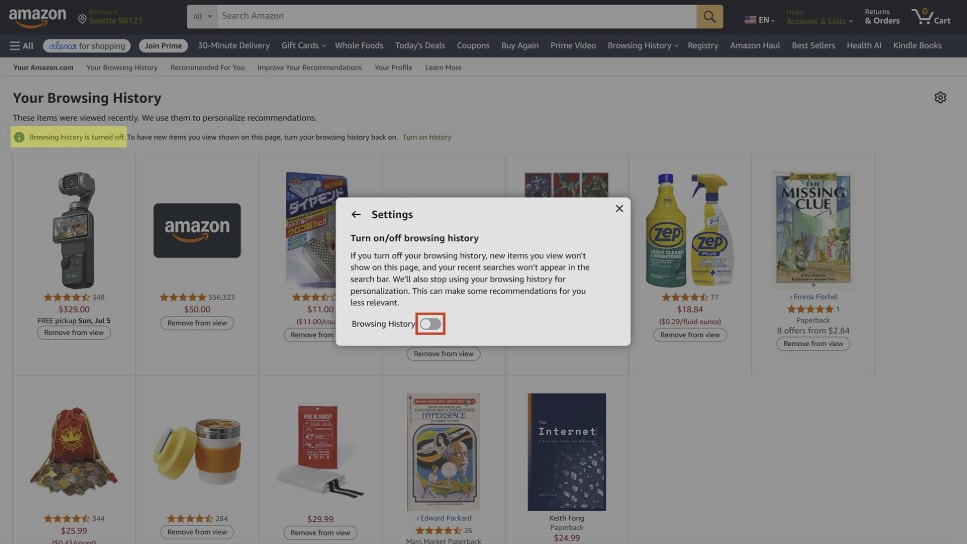
From your Browsing History page, click the settings icon in the top-right corner to open more options.
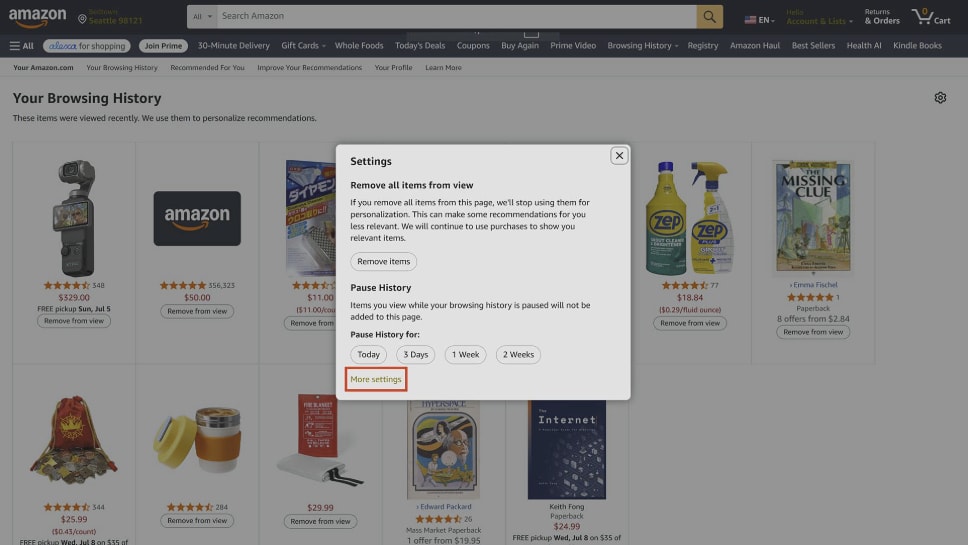
Selecting More settings opens additional privacy controls.
From there, click the Browsing History toggle to turn it off.
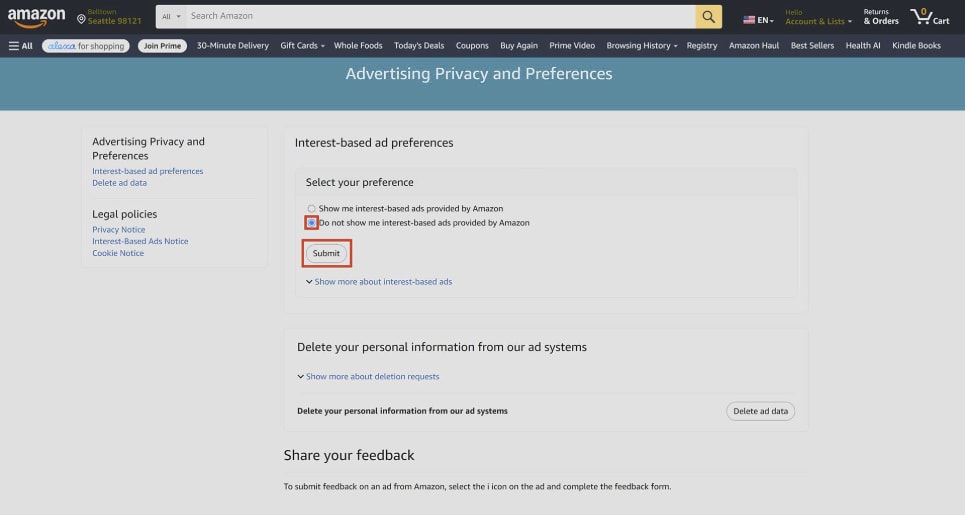
Next, in Advertising Privacy and Preferences, select “Do not show me interest-based ads provided by Amazon” and click Submit.
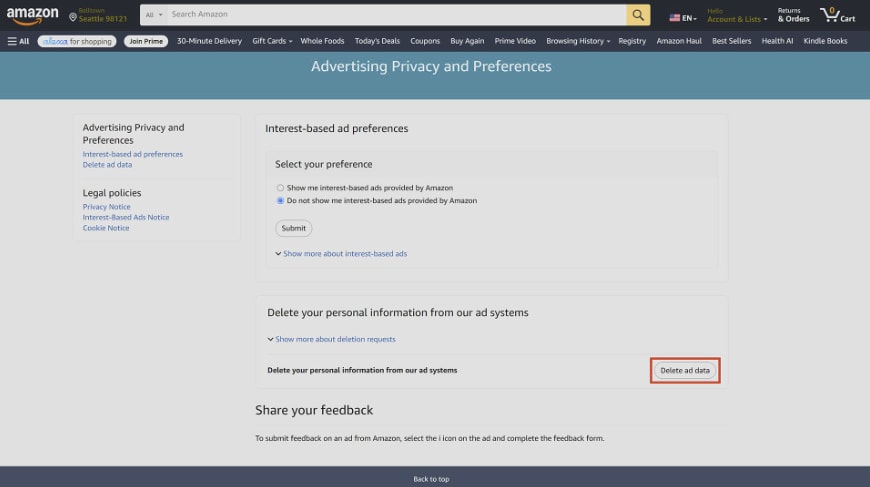
Clicking Delete ad data removes your personal information from Amazon’s advertising systems.
How Ring cameras collect and share your data
Video doorbells have become one of the most popular smart home devices on the market, and Amazon’s Ring has played a major role in that growth. Being able to see who’s at your door, receive motion alerts while you’re away, and review recorded footage can be useful and convenient.
But these features also rely on cameras that are constantly monitoring the area around your home and, in many cases, uploading footage to the cloud.
Ring has expanded its AI-powered features(new window). New tools such as facial recognition and features that can help locate lost pets(new window) aim to make neighborhood security more collaborative. However, these systems work by analyzing and sharing more visual data than traditional security cameras. Some of these features are enabled by default, meaning users may participate without fully understanding what information is being collected or how it’s used.
Ring has faced criticism over its own security. In 2019, attackers gained access to thousands of Ring accounts by using stolen credentials from unrelated data breaches and were able to view live camera feeds and speak through the devices(new window)‘ built-in microphones(new window). The incident highlighted the importance of using unique passwords and enabling two-factor authentication.
Ring has also been criticized for sharing footage with law enforcement without a warrant. The company says it complies with legal requests and emergencies, but reports have shown that video footage has been provided to police(new window) without a warrant or the user’s explicit permission. For privacy-conscious users, this raises important questions about who ultimately controls cloud-stored recordings.
How to protect yourself
If you own a Ring device, disable features such as Search Party, Community Requests, and any optional marketing or analytics sharing if you don’t intend to use them. Enable end-to-end encryption where supported to better protect recordings in transit, and configure privacy zones so your camera avoids capturing public footpaths or neighboring properties whenever possible. (See instructions below.)
If you’re shopping for a new security camera, consider devices that prioritize local storage over cloud storage. Cameras that support recording directly to an SD card or network video recorder (NVR) reduce your dependence on a manufacturer’s servers. Brands like Reolink(new window) offer cameras built around this local-first approach.
Support for standards such as Real-Time Streaming Protocol (RTSP) and Open Network Video Interface Forum (ONVIF) also makes it easier to integrate cameras into your own home network without relying exclusively on proprietary cloud services.
Ultimately, no internet-connected camera can guarantee complete privacy. But by understanding where your footage is stored, who can access it, and which features you’ve enabled, you can make more informed decisions about the trade-offs between convenience and control.
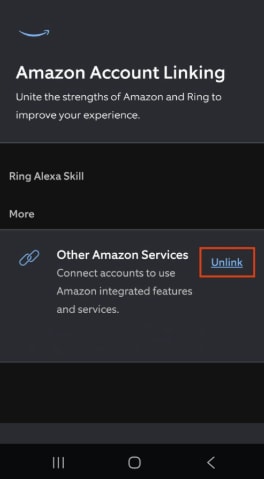
In the Ring app, open Control Centre and tap Amazon Account Linking.
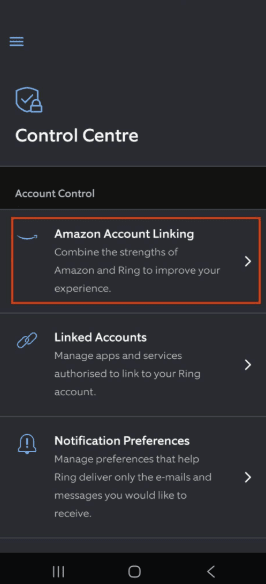
Click Unlink next to Other Amazon Services.
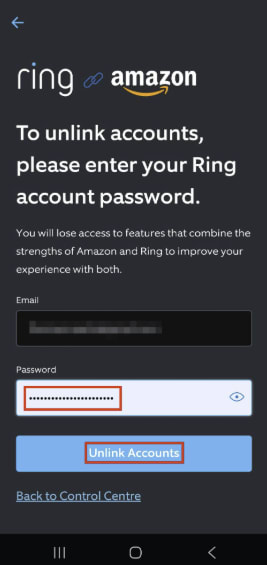
Enter your Ring account password and tap Unlink Accounts to confirm.
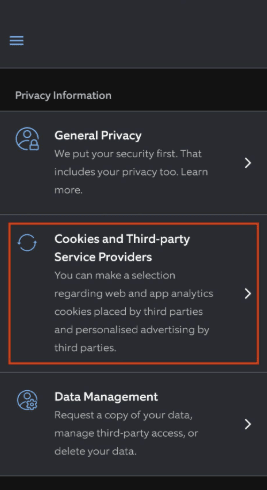
To limit analytics sharing, go to Privacy Information in the Ring app menu and tap Cookies and Third-party Service Providers.
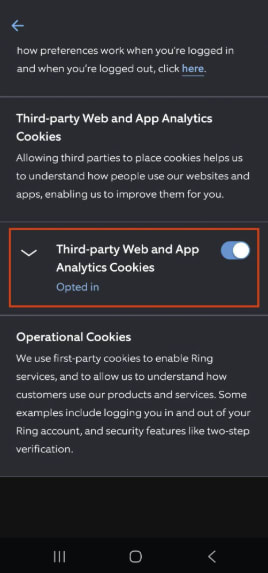
Toggling off Third-party Web and App Analytics Cookies opts you out of third-party analytics tracking.
How Fire TV and Kindle track what you watch and read
When you’re reading on your Kindle or streaming through Fire TV(new window), Amazon is also collecting information about you.
Kindle devices, for example, record more than the books you purchase. Depending on your settings and how you use the device, Amazon may also collect your reading progress, the amount of time you spend reading, the passages you highlight, the notes you make, and the words you look up in the built-in dictionary.
Fire TV knows how you use the device, what apps you open, what content you watch, and what you search for. It also supports Automatic Content Recognition (ACR), a technology that identifies what’s being displayed on your screen by taking hundreds of screenshots of your viewing behavior in an effort to support targeted advertising.
The challenge is that even if you replace your streaming device, your television itself may still collect similar information if it’s connected to the internet.
How to protect yourself
If privacy is your priority, start by reviewing your Fire TV privacy settings and disabling any optional data collection or interest-based advertising. You can also reduce data collection by keeping your television offline and using a dedicated streaming device instead. If you’d rather reduce tracking, Apple TV(new window) collects less viewing data than many of its competitors . Likewise, Kobo e-readers paired with Calibre offer a way to build a digital library without relying entirely on Amazon’s ecosystem.
No connected entertainment device is completely private. However, understanding which device is collecting your data can significantly reduce how much information is shared while still letting you enjoy your favorite books, films, and TV shows.

How Alexa collects and uses your voice data
Smart speakers like Amazon Echo and their built-in virtual assistants like Amazon Alexa have become a convenient way to control lights, play music, set reminders, and answer questions without lifting a finger. But they work by doing something many other devices don’t: They listen for your voice. While Echo devices are designed to activate only after hearing a wake word, they have become the subject of privacy concerns.
One notable incident occurred in 2018, when an Echo mistakenly sent a private conversation(new window) between a couple to one of their contacts. Amazon said that an unlikely sequence of misinterpreted voice commands was to blame, but it served as a reminder that voice assistants aren’t infallible.
Amazon has also faced scrutiny over how it handles voice recordings after reports revealed that employees reviewed a sample of Alexa interactions to help improve speech recognition systems. Separately, the US Federal Trade Commission fined Amazon over allegations that it retained children’s Alexa voice recordings even after parents requested they be deleted. These incidents raised broader questions about how long voice recordings are stored, who can access them, and how they’re used.
As generative AI has become increasingly important to technology companies, voice data has taken on greater value. Amazon has announced new AI-powered Alexa features that rely on cloud processing, meaning voice requests are analyzed on Amazon’s servers rather than entirely on the device itself. For users concerned about privacy, this represents another trade-off for convenience.
See how Amazon uses your data for AI training and how to opt out.
How to protect yourself
Amazon provides several controls that allow you to reduce the amount of information linked to your account. You can review and delete your voice history, choose how long recordings are retained, and opt out of using voice recordings to help develop new Amazon services where those options are available.
If you’d rather avoid sending voice commands to the cloud altogether, it may be worth considering smart home platforms that support local voice processing. Open-source solutions like Home Assistant Green(new window) can process commands on local hardware. While these systems often require more technical setup than a plug-and-play smart speaker, they offer a level of transparency and control that many commercial devices don’t.
Ultimately, the convenience of a voice assistant comes down to trust. If you’re comfortable sending voice commands to a cloud service in exchange for smarter features, Alexa remains one of the most capable assistants available. But if you prefer to minimize the amount of personal data leaving your home, reviewing Alexa’s privacy settings or choosing a locally processed alternative can help you regain more control over what your smart speaker hears.
In the Alexa app, go to More and tap Alexa Privacy.
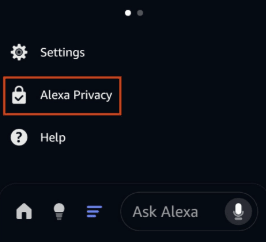
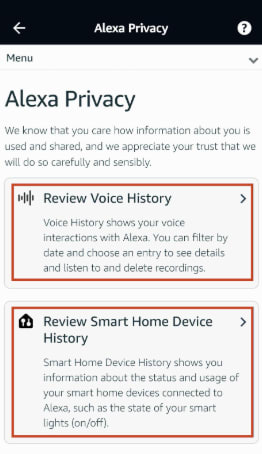
Review Voice History lets you delete your voice recordings, while Review Smart Home Device History shows your connected device activity.
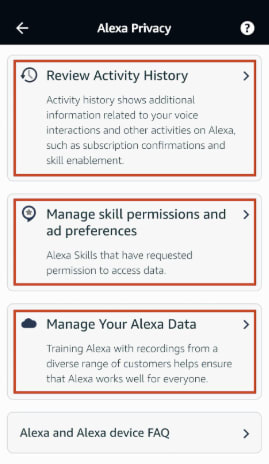
Scrolling further, you’ll find Review Activity History, Manage skill permissions and ad preferences, and Manage Your Alexa Data. Here, you’ll find additional ways to limit what Alexa collects and shares.
Amazon-owned companies you may not realize are collecting your data
Even if you stop shopping on Amazon, you may still be using Amazon-owned services without realizing it. The company has acquired businesses that span entertainment, books, gaming, groceries, and retail. While each service has its own purpose, many also collect information that contributes to your overall Amazon profile.
Film fans may frequent IMDb, bookworms may track their reading lists on Goodreads, audiobook listeners might subscribe to Audible, gamers are likely familiar with Twitch, and shoppers may regularly visit Whole Foods or Zappos. On the surface, these brands operate independently, but behind the scenes, they’re within Amazon’s ecosystem.
Whole Foods is perhaps the clearest example of Amazon extending its reach into the physical world. In addition to integrating Amazon Prime discounts, the company has experimented with technologies designed to connect in-store purchases with customers’ online identities. One example was Amazon One, a palm-scanning payment system(new window) that allowed shoppers to pay by scanning their hand instead of using a card or phone. Although Amazon has essentially phased out the technology at Whole Foods stores, it demonstrated the company’s ambition to link physical shopping with digital customer profiles.
How to reduce your data flowing into Amazon
Replacing every service overnight isn’t realistic or necessary. Instead, consider switching the services you use most often. StoryGraph(new window) offers an alternative to Goodreads for tracking books, TMDB(new window) provides movie and television information without relying on Amazon, and audiobook listeners can explore services like Libro.fm(new window) or borrow titles through Libby using a local library membership.
When it comes to groceries and everyday shopping, supporting local businesses can reduce your dependence on a single retailer. Recognizing just how broad Amazon’s ecosystem has become can help you make small changes that can significantly reduce how much of your digital life is tied to a single account.
What is Amazon Web Services (AWS), and why does it matter?
It may surprise you to find out that Amazon’s most profitable business isn’t its marketplace or Prime. It’s Amazon Web Services (AWS), one of the world’s largest cloud-computing platforms.
Many businesses use AWS to host websites, store data, run applications, process transactions, and deliver online services to millions of users around the world.
This became clear during major AWS outages(new window) in late 2025, which disrupted businesses, government agencies, healthcare providers, and popular online services. When a cloud provider of this scale experiences problems, the effects ripple across the internet, preventing users from accessing banking apps, streaming platforms, and other sites.
Interestingly, unlike Amazon’s retail business, AWS isn’t collecting data. Instead, its influence comes from its position as critical infrastructure. If a website or service is hosted on AWS, Amazon provides the computing power that keeps it online. A significant portion of the internet depends on this infrastructure.
This position also gives AWS considerable influence over the services it hosts. Over the years, AWS has suspended or removed customers from the platform after determining they had violated its terms of service. While supporters argue these decisions help protect users and maintain platform integrity, critics point out that when a small number of cloud providers host a large share of the internet, those decisions can have far-reaching consequences.
For individual users, however, there isn’t a practical way to avoid AWS entirely. You can neither easily tell whether the websites, apps, or online services you use are hosted on Amazon’s infrastructure, nor can you choose which cloud provider those companies rely on.
What you can control is the infrastructure you use yourself. Privacy-conscious users may prefer to self-host services such as cloud storage or media libraries using their own hardware instead of relying entirely on large cloud providers. Platforms like Nextcloud make this increasingly accessible.
Self-hosting isn’t for everyone. It requires time, maintenance, and a willingness to learn. But for those who value privacy and digital independence, it offers an alternative to large cloud providers. Even moving a handful of personal services off the cloud can reduce the amount of data entrusted to big technology companies.
How to reduce Amazon’s tracking without giving up convenience
Amazon’s products and services are designed to work together. A purchase on Amazon.com can lead to a recommendation on your Kindle. A Ring camera can integrate with Alexa. Prime connects shopping, entertainment, and groceries under a single account. Behind the scenes, AWS powers a significant portion of the internet itself. Individually, these services can be genuinely useful. Collectively, they give Amazon an unusually broad view of your digital life.
For many people, breaking out of Amazon’s box isn’t that simple. But privacy isn’t an all-or-nothing decision. Every step you take can help to reduce the amount of information Amazon has on you.
The most important thing is to make choices deliberately. Convenience often comes at the cost of sharing more personal data, but understanding those trade-offs puts you back in control.